Multitenancy on Kubernetes with Istio, External Authentication Server and OpenID Connect (Part 1 — Authentication)
Originally published on Medium, under the HAL24K TechBlog publication (October 2019).
Before diving into technical details, it makes sense to note that multitenancy is a complex topic, often understood differently depending on the task you’re trying to achieve and who you’re talking to. So to set the stage: here’s what I mean by multitenancy in this post.
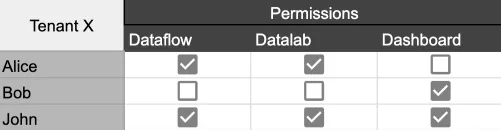
At HAL24K we provide clients with AI-based decision support daily, combining data science services with Dimension, our SaaS-based data science platform. When you subscribe to the platform, you choose which modules are relevant to your business — data processing (dataflow), model training (datalab), dashboards, and more — and can give all your users access to those modules, or only specific ones. This kind of multitenancy can be represented as a standard matrix permissions structure, as in the diagram below.
I’ll focus on application-level multitenancy on Kubernetes — how people access applications in the browser — not Kubernetes-level multitenancy (how people perform tasks on the cluster itself).
High-level solution overview
To ground this in a concrete example, I’ll show how JupyterHub can run in a multitenant way on Kubernetes. We use JupyterHub because our data scientists rely on it heavily, and it already has Kubernetes integration to spin up Jupyter notebooks as pods, so we don’t need to write our own management layer for that. If you’re managing some other application as independent instances without a management layer, the same tooling still applies — I’ll show that too.
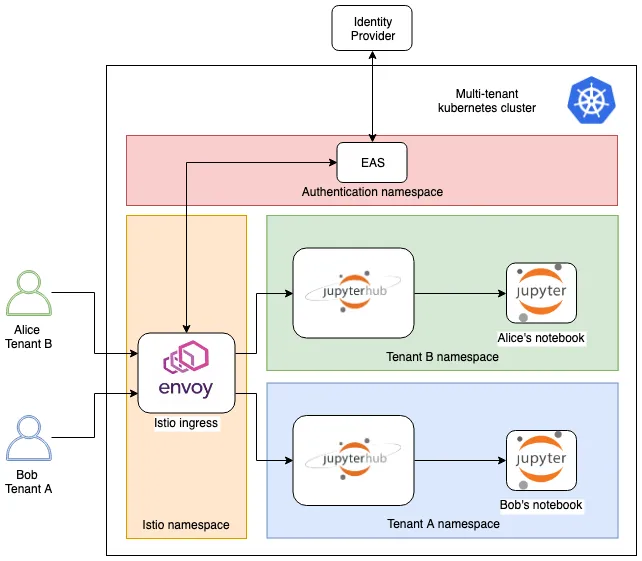
Say Alice and Bob work at different companies and both use our platform. When either tries to access JupyterHub, they authenticate first, and their request is then routed to their own Jupyter notebook instance (or whichever other application they’re requesting and have access to — JupyterHub is just the example here). Three core components make this possible:
- OpenID Connect (OIDC): verifies the end user’s identity and retrieves the permissions described above.
- External Authentication Server (EAS): performs the actual authentication, and can use various schemes — OIDC in our case, though it supports more.
- Istio: the service mesh routing user requests to the right backends, securing traffic inside the cluster, and enforcing policy — checking which application the user wants, checking their permissions, and allowing or denying the request.
Each tenant also gets a separate namespace, which we need for resource management, billing, security, and routing (more on that below).
Technical overview
Let’s get into how the actual separation between tenants, their users, and platform modules works. First, we separate tenant and module via DNS, following the convention module_name.tenant_name.example.com — since a tenant may only have some modules enabled, and we don’t want to provision resources for modules nobody’s using.
We use Istio Gateway and VirtualService resources to route traffic to the right module. The gateway specifies hostnames, ports, and TLS certificates for incoming requests; VirtualService handles URL paths, request methods, and destination backends.
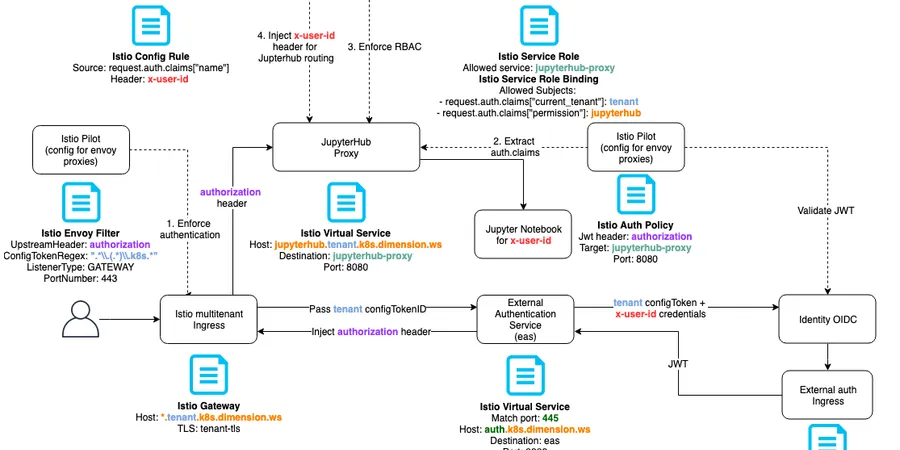
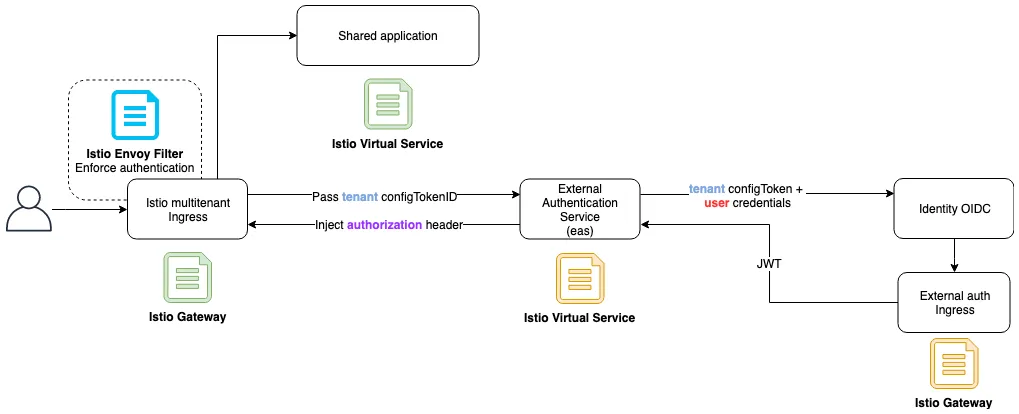
Before a request can reach any endpoint inside the cluster, it has to be authenticated, so we added an authz envoy filter to the Istio gateway. Envoy filters extend proxy functionality with custom logic — in our case, incoming requests get redirected from the gateway to the EAS service, which in turn talks to our identity provider using tenant-specific client credentials.
One genuinely nice thing about EAS: a single instance can hold multiple OIDC client connections, one per tenant. All the connection info for the identity provider lives in a config_token, generated ahead of time and provided to the reverse proxy (via EnvoyFilter, in our case). Embedding those tokens directly in the URL makes the config ugly fast, and you can hit URL length limits — so EAS also supports server-side tokens, which store the token on the backend and put only a reference to it in the proxy config. We still didn’t want to configure that reference by hand for every tenant, so a colleague on the team modified EAS to fetch token references dynamically based on a domain-name regex — if the domain is *.tenantA.example.com, it fetches tenantA’s config_token from the backend automatically. We’re now discussing upstreaming that as a feature. EAS is a genuinely great project, and its sole maintainer, Travis Hansen, is remarkably responsive — worth checking out if any of this is relevant to you.
Once authentication is done, we still have to check whether the user is allowed to access the requested module. User info comes through as claims in the OIDC id_token, a JSON Web Token (JWT). Decoded, a stripped-down version looks like this:
{
  "nbf": 1568720155,
  "exp": 1568723755,
  "name": "lushpenko",
  "email": "maksym.lushpenko@hal24k.com",
  "current_tenant": "tenantA",
  "permissions": ["datalab", "dataflow"]
}
The important bits are current_tenant, name, and permissions — enough to decide whether to allow or deny the request. Our EAS token configuration, in generate-config-token.js, looks like this for each tenant:
eas: {
  plugins: [
    {
      type: "oidc",
      issuer: {
        discover_url: "https://example.com/.well-known/openid-configuration",
      },
      client: {
        client_id: "tenantA",
        client_secret: "tenantSecret",
      },
      scopes: ["openid", "profile", "email", "login_info"], // must include openid
      redirect_uri: "https://auth.example.com:445/oauth/callback",
      features: {
        authorization_token: "id_token",
      },
      assertions: {
        exp: true,
        /**
         * assert the 'not before' attribute of the token(s)
         */
        nbf: false,
        iss: true,
        userinfo: [],
        id_token: [],
      },
      cookie: {
        domain: "example.com", // defaults to request domain, could do sso with more generic domain
      },
    },
  ], // list of plugin definitions, refer to PLUGINS.md for details
}
If you’re familiar with OIDC, we use the authorization code flow. A few things worth calling out:
login_infois our custom scope, signaling our single sign-on (SSO) server to include session login info.redirect_uriuses a distinct host and port (https://auth.example.com:445), because the EAS service itself shouldn’t be behind authentication — and we already have anEnvoyFilterenforcing authentication on all HTTPS traffic on port 443.authorization_tokenis set toid_token, so the relevant claims land in the Authorization header we use later to make the access decision.nbf: false— we had a clock difference between our identity provider and the EAS pod, and “not before” validation fails if you set this totrueunder that condition. Not ideal, but I’ve hit the identical issue at more than one company since, so there’s a decent chance you’ll run into it too.- The cookie domain is set to
example.com, giving us SSO across every application onmodule_name.tenant_name.example.comsubdomains.
This setup completes the authentication flow, and lets us deploy simple applications per tenant, shared between that tenant’s users:
Next week, I’ll publish the second part of this series, covering how we limit user access within a single tenant, so users can only reach their own copy of the application.