Multitenancy on Kubernetes with Istio, External Authentication Server and OpenID Connect (Part 2 — Authorization)
Originally published on Medium, under the HAL24K TechBlog publication (October 2019).
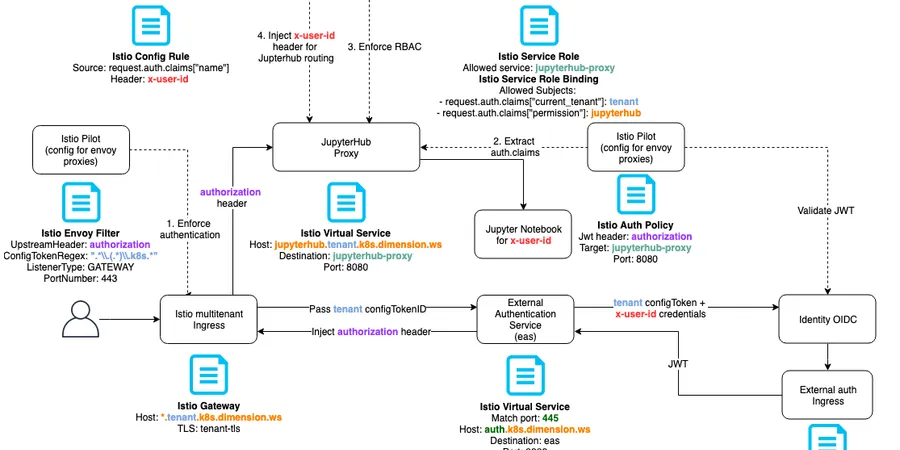
In the previous post, I covered how an External Authentication Server is used at HAL24K, together with OIDC and parts of Istio, to authenticate users and route them to a shared application within a specific tenant’s Kubernetes namespace. That post ended with receiving an id_token from our identity provider. This time: how that id_token lets us decide whether a given user should actually reach a specific application instance. The token carries the current tenant, the user’s name, and which platform modules they can access — passed to our application by EAS via the Authorization header.
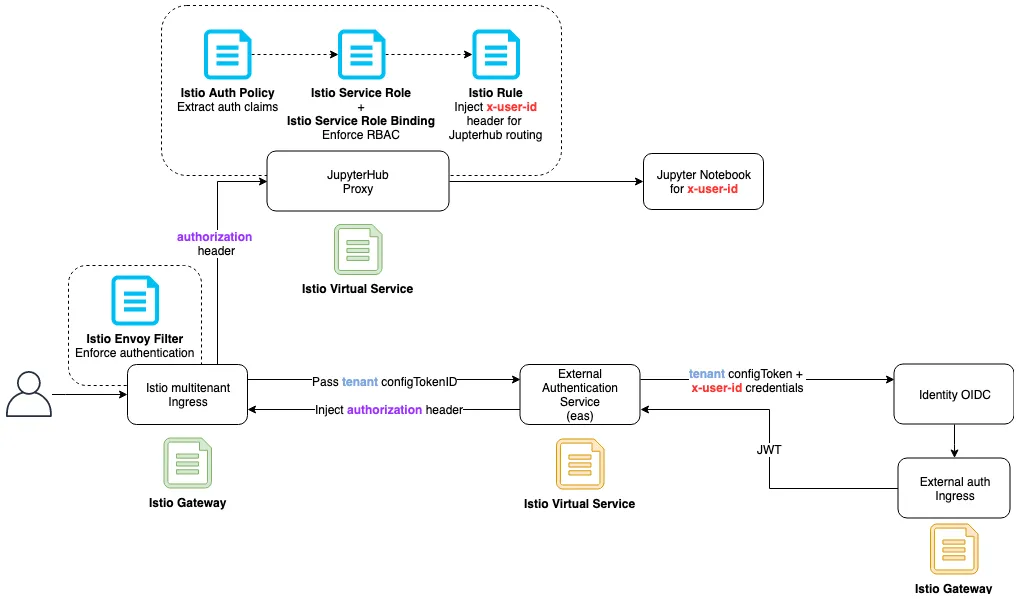
The id_token arriving in that header is still encoded as a JSON Web Token, and something needs to parse it. Istio has a concept called End User Authentication: it extracts the JWT from the Authorization header (other headers are possible too), validates it against the identity provider (OIDC), and parses it into the request.auth object other Istio components can use.
With the user’s information now available in a usable format, the next step is deciding whether to allow or deny the request. Istio’s Authorization functionality handles this for both HTTP and TCP services, and it’s both powerful and reasonably flexible: ServiceRole specifies which service inside the cluster to protect, and exactly how (methods and paths); ServiceRoleBinding specifies who can use a given ServiceRole — and that’s where the actual allow/deny decision happens, based on the request.auth claims described above. So for every module inside a tenant’s namespace, we define a ServiceRole, then use a ServiceRoleBinding to check whether the current user belongs to the tenant and holds the right permissions.
Multi-user configuration
So far this covers logging in, and deciding whether a user can reach a specific application while belonging to the right tenant. But knowing a user has access to JupyterHub in general isn’t enough — access needs to be scoped down to their specific notebook. This is where the setup genuinely diverges between our example application (JupyterHub) and a generic solution. I’ll cover JupyterHub first, since it’s the running example, then the generic case for any application.
JupyterHub
I mentioned in the first post (see “High-level solution overview”) that JupyterHub already has some Kubernetes integration. The Kubernetes-specific parts are handled by kubespawner, which manages the lifecycle of single-user Jupyter notebooks. To get kubespawner working together with EAS — making JupyterHub aware of our already-authenticated users — a colleague used this project. With two lines in jupyterhub_config.py:
c.JupyterHub.authenticator_class = RemoteUserAuthenticator
c.RemoteUserAuthenticator.header_name = "X-User-Id"
we can propagate the current user’s identity to JupyterHub via the X-User-Id header. The remaining question: how do we set that custom header, and populate it with the actual username? Istio again — we use an Istio policy rule to append the X-User-Id header based on request.auth.claims["name"]. That’s only possible once Istio Policy Enforcement is enabled, handled by a component called Mixer. That completes multi-user separation within a single tenant for JupyterHub — the full diagram:
Generic solution
To make a new application multitenant on Kubernetes without writing your own authentication and authorization from scratch, you need some way to manage each instance’s access and routing outside the application itself — JupyterHub happens to handle access and routing for single-user notebooks on its own, which is what makes it a convenient example. That kind of access management can be done via path-based or header-based request routing. That’s essentially what JupyterHub does under the hood; here’s how to do the same with Istio directly.
Header-based routing works by matching a specific header to the username, then routing the request to a user-specific instance — jupyter-maksym, say. The drawback: you still need Istio’s policy functionality to populate that header, which is extra work and complexity.
Path-based routing works by creating a VirtualService that rewrites a request from http://module_name.tenant_name.example.com/maksym to http://module_name-maksym, reaching the module_name-maksym pod inside the tenant_name namespace.
You might reasonably point out that anyone could change the URL path to someone else’s username and reach an instance they don’t have permission for — that’s exactly why Istio’s ServiceRole and ServiceRoleBinding are still needed here, to make sure only the user maksym can actually reach the module_name-maksym service.
Both approaches — header-based and path-based — share a drawback: pods and roles need to be pre-created per user, ahead of time. That’s unavoidable if your application doesn’t have a management layer with Kubernetes integration the way JupyterHub does. To be concrete: when a user opens JupyterHub and launches a notebook, JupyterHub itself handles pod creation and routing. An application without that management layer needs several Istio components in place before the user ever hits the URL in their browser — one option is a webhook that provisions those components the moment a user is granted the relevant permission in your identity provider.
Here’s what a generic setup could look like for the path-based routing approach:
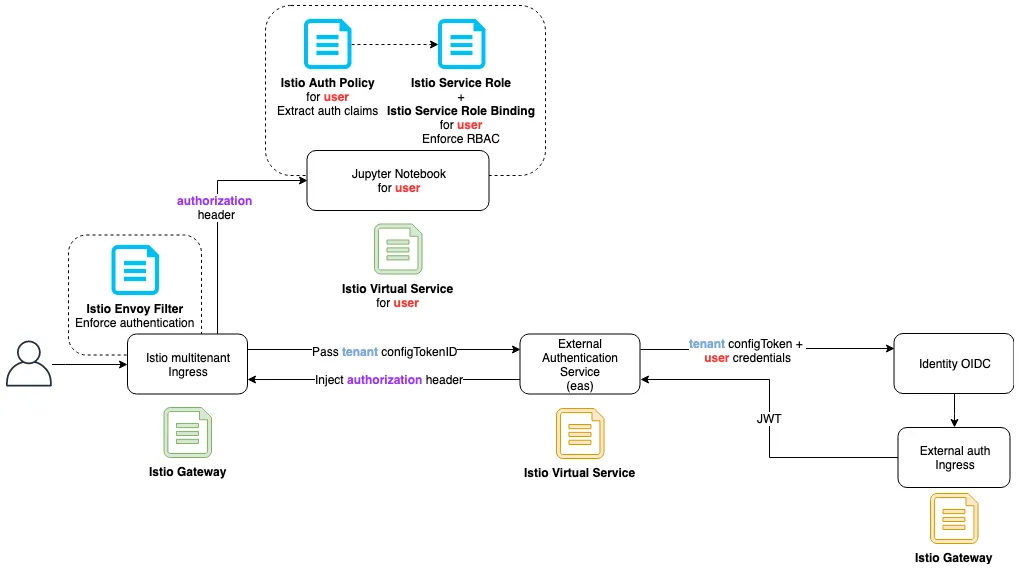
It’s very similar to the previous diagram, just without the Istio policy Rule. The other difference: Istio roles, bindings, and auth policies here are user-specific, rather than one policy/role/binding per platform module.
With some user-specific labels applied to every instance belonging to a given user (pods datalab-maksym, dataflow-maksym labeled user=maksym), you could likely cut down the number of ServiceRole and AuthPolicy resources needed — though I haven’t tested that myself.
Final remarks
The diagram in this series’ banner image is genuinely information-dense, and I’ve been describing simplified slices of it throughout both posts. Given how much complexity Istio brings, I’d be glad to spend more time walking through that diagram directly, with full Istio configuration snippets, if there’s interest — let me know if a more detailed JupyterHub setup would be useful as a follow-up.
Special thanks to Samuel Hessel, Tim Stokman, and Travis Hansen for their collaboration on this work.