Creating Docker config.json for External Systems
Originally published on Medium (March 2021).
When you’re using Docker on your laptop with any kind of registry, there’s a very good chance you’re using some type of credentials store to keep your registry credentials secure.
In that case, your config.json file looks something like this:
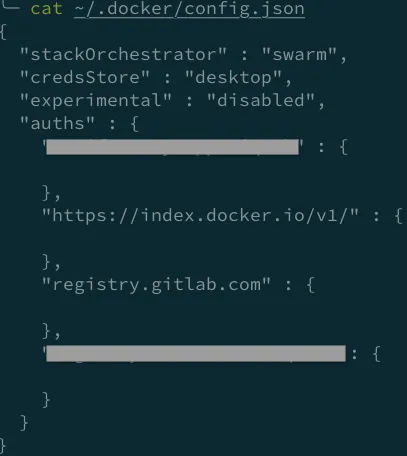
The problem comes when you have to create credentials for your pipeline to push Docker images to a private registry, or to provide a secret for pulling images into a Kubernetes cluster. Per the Kubernetes documentation, the file that’s expected should contain base64-encoded credentials directly:
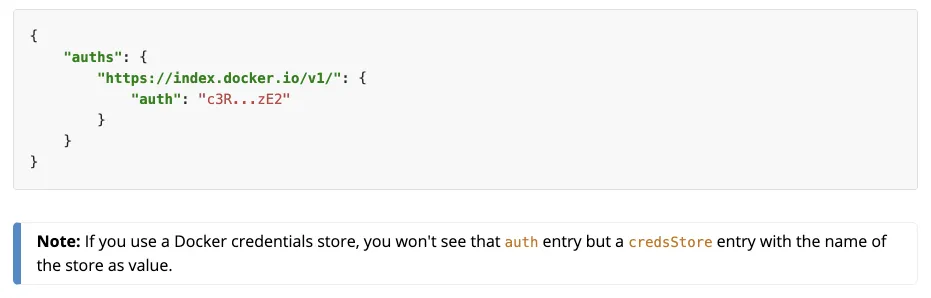
So you can either craft this file manually, or use the Docker command line with one extra step of removing the credentials helper, to get it to save credentials directly in config.json. To avoid messing up your own config.json, follow these steps:
-
Login to your registry by specifying a custom config directory:
$ docker --config /tmp login registry.gitlab.com $ cat /tmp/config.json { "auths": { "registry.gitlab.com": {} }, "credsStore": "osxkeychain" } -
Remove the
credsStoreline, and the now-extra comma after theauthsblock. -
Run the login command again, and you’ll get a
config.jsonfile with base64-encoded credentials ready to use in external systems.
It’s a simple task that can become annoying easily if you don’t remember the details of Docker’s authentication setup, so I wrote this short tutorial since I have to do it myself from time to time.